Spaced Repetition in Obsidian: Beating the Forgetting Curve with Dataview
A second brain helps you retrieve knowledge, but it won't help you remember it. Here's how I paired my Obsidian Zettelkasten with spaced repetition and Dataview to beat the Ebbinghaus Forgetting Curve.
In my first article, I wrote about switching from Notion to Obsidian and using Zettelkasten to structure my notes. It's been serving me really well as a second brain, a way to externalize and organize knowledge so it's easily accessible whenever you need it.
There's one catch, though. If you're studying for an exam, preparing for a discussion, evolving a skill, or job hunting, you actually need to remember things. The whole second brain premise is that you don't need to memorize anything since you have a reliable retrieval system, but sometimes that's just not enough.
In today's article, I'll show you how to pair your Zettelkasten notes with a spaced repetition methodology to fight the Ebbinghaus Forgetting Curve.
What is the Forgetting Curve
In the 1880s, German psychologist Hermann Ebbinghaus described a concept with a pretty intuitive meaning: after learning something, you start forgetting it over time.
So how do you counter it? You review the material on a consistent schedule. After one day, three days, one week, two weeks, one month, and so on.
Back in Notion, I managed this with a simple database table. The columns were: a link to the note, the current review cadence (1 day, 3 days, etc.), and the next review date. Sorting by that last column ascending gave me a clean priority queue.
The same setup in Obsidian
Obsidian doesn't have native database-style lists with that level of flexibility, not out of the box anyway. But that's where the community comes in, which is honestly what makes Obsidian so powerful.
I went looking for existing solutions for the Forgetting Curve. I found a few flashcard-based plugins, but that's not really my style. Digging further, I landed on Dataview, a plugin that essentially turns your notes into a queryable database based on frontmatter properties you define.
Defining frontmatter properties
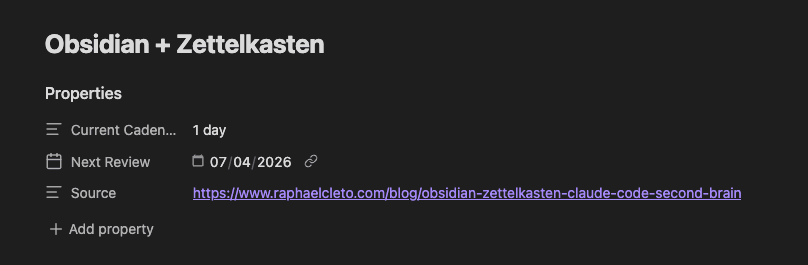
Obsidian has built-in support for Properties, which lets you label your notes with structured data that plugins like Dataview can work with. Just type --- at the top of any note and a small UI will appear for defining fields.
For this setup, I used three fields, similar to what I had in Notion:
- Current cadence: an enum with options for 1 day, 3 days, 1 week, 1 month, 3 months, and 6 months
- Next review: a date field used for sorting the priority queue
- Source: a link to the resource I used when writing the note
The Forgetting Curve Manager
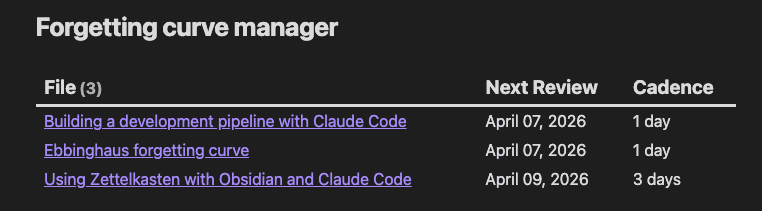
With your notes structured, you can build the Dataview query:
TABLE
	row["Next Review"] AS "Next Review",
	row["Current Cadence"] AS "Cadence"
WHERE
	row["Next Review"] != null
SORT
	row["Next Review"] ASC
Breaking it down:
TABLEtells Dataview to display results as a table- The two column declarations read the Next Review and Current Cadence frontmatter properties and label them accordingly
- The
WHEREclause filters out any notes without a review date set SORTorders everything by review date, creating the priority queue
The result is exactly what I had in Notion, a list sorted by the most urgent review date.